Streamline EC2 Capacity Management: AWS Introduces Unified Monitoring and Optimization Interface
Managing Amazon EC2 capacity at scale has historically required navigating multiple AWS services, building custom automation, and manually aggregating data from various sources. For organizations running hundreds of instance types across multiple Availability Zones and accounts, this complexity creates significant operational overhead and increases the risk of costly inefficiencies going unnoticed.
Amazon has addressed this challenge with the launch of Amazon EC2 Capacity Manager, a centralized solution that consolidates capacity monitoring, analysis, and management into a single, unified interface. This new service eliminates the need for custom data collection tools and provides actionable optimization recommendations with hourly refresh rates.
The Challenge of Multi-Account EC2 Capacity Management
Organizations leveraging Amazon EC2 at enterprise scale face a complex operational landscape. Modern cloud infrastructures typically span:
- Hundreds of different instance types optimized for specific workloads
- Multiple Availability Zones for high availability and disaster recovery
- Numerous AWS accounts following best practices for organizational separation
- A mix of capacity types: On-Demand Instances, Spot Instances, and Capacity Reservations
Before EC2 Capacity Manager, accessing comprehensive capacity data required piecing together information from:
- AWS Management Console - Manual navigation across multiple accounts and regions
- Cost and Usage Reports - Delayed billing data requiring custom processing
- Amazon CloudWatch - Metrics scattered across different namespaces and dashboards
- EC2 describe APIs - Programmatic access requiring custom automation scripts
This fragmented approach created several critical pain points:
Operational Overhead
Teams spent valuable engineering time building and maintaining custom automation just to collect and consolidate basic capacity information. This diverted resources from more strategic initiatives and innovation.
Limited Visibility
Without a unified view, identifying underutilized resources, analyzing usage patterns, or comparing capacity across regions required extensive manual effort and cross-referencing multiple data sources.
Delayed Optimization
The lack of real-time, consolidated capacity insights meant cost-saving opportunities remained hidden for extended periods, directly impacting cloud spending efficiency.
Context Switching
Engineers constantly switching between different AWS services and tools experienced reduced productivity and increased cognitive load, slowing down decision-making processes.
Introducing Amazon EC2 Capacity Manager
EC2 Capacity Manager transforms capacity management by providing a comprehensive, centralized dashboard that aggregates all capacity data with hourly refresh rates. The service delivers:
Unified Multi-Account Visibility
- Consolidated view across all commercial AWS Regions
- Cross-account capacity metrics in a single interface
- Automated data aggregation eliminating custom tool development
Comprehensive Capacity Insights
- On-Demand Instances usage tracking and trends
- Spot Instance utilization and interruption patterns
- Capacity Reservations efficiency analysis
- Reserved Instances and Savings Plans coverage
Actionable Optimization Opportunities
- Prioritized list of underutilized Capacity Reservations
- Cost impact analysis for unused capacity
- Usage pattern identification for rightsizing decisions
- Spot Instance optimization recommendations

Getting Started with EC2 Capacity Manager
Enabling EC2 Capacity Manager is straightforward and requires no complex setup or configuration:
Initial Setup
-
Navigate to the Service
- Open the AWS Management Console
- Go to Amazon EC2
- Select Capacity Manager from the navigation pane
-
Enable the Service
- Activate EC2 Capacity Manager through the service settings interface
- The service automatically aggregates historical data from the previous 14 days during initial setup
- No additional infrastructure deployment or configuration required
-
Configure Multi-Account Access (Optional)
- Organization administrators can enable enterprise-wide visibility
- Delegate access to specific accounts while maintaining appropriate permissions
- Centralized management across AWS Organizations
No Additional Cost
EC2 Capacity Manager is available at no additional charge. You only pay for the underlying EC2 resources you consume—the management and monitoring capabilities are provided free of charge.
Comprehensive Dashboard Features
Capacity Overview Cards
The main dashboard provides an at-a-glance view of your entire EC2 capacity landscape through three primary metric cards:
Reservations
- Total reserved capacity across all accounts and regions
- Utilization percentage with trend indicators
- Period-over-period change analysis
Usage
- Total EC2 compute consumption broken down by type
- Reserved vs. unreserved usage comparison
- Spot Instance contribution to overall capacity
Spot Instances
- Dedicated Spot usage metrics and trends
- Interruption pattern analysis
- Cost efficiency indicators
Each card displays percentage changes and trend indicators, enabling you to quickly identify significant capacity pattern shifts without diving into detailed reports.
Advanced Filtering and Analysis Options
EC2 Capacity Manager provides flexible data visualization options to support diverse analysis requirements:
Multi-Dimensional Filtering
- Date Range Selection - Analyze historical trends over custom periods
- Time Zone Configuration - View data in your preferred time zone
- Interval Settings - Adjust granularity for detailed or high-level views
Unit of Measurement Options You can switch between different units to understand resource consumption from multiple perspectives:
- vCPUs - Analyze compute capacity in virtual CPU hours
- Instance Counts - Track the number of instances deployed
- Estimated Costs - View financial impact based on On-Demand pricing
Cost estimates use published On-Demand rates as a baseline reference, excluding Savings Plans and other discounts. This standardized pricing helps compare the relative cost impact of underutilized capacity across different instance types. For example, 100 vCPU hours of unused p5 instance reservations represents significantly higher cost impact than 100 vCPU hours of unused t3 reservations.
Usage Metrics and Visualization
The dashboard provides comprehensive usage analytics through two complementary views:
Total Usage Breakdown Visualize how your EC2 capacity is distributed across:
- Reserved usage (Capacity Reservations and Reserved Instances)
- Unreserved On-Demand usage
- Spot Instance usage
Usage Over Time Charts Track capacity consumption trends with time-series visualizations that help identify:
- Usage pattern evolution
- Peak demand periods
- Seasonal variations
- Growth trajectories
These visualizations enable data-driven decisions about future capacity planning and reservation purchases.

Reservation Optimization Insights
One of EC2 Capacity Manager's most valuable features is its ability to identify and quantify underutilized Capacity Reservations.
Reserved Capacity Trends
The Reserved capacity trends visualization displays:
- Used vs. unused reserved capacity across selected time periods
- Proportion of reserved vCPU hours actively consumed vs. sitting idle
- Utilization efficiency patterns over time
- Periods of consistent low utilization indicating optimization opportunities
This visibility directly impacts cost efficiency by highlighting Capacity Reservations that aren't providing value proportional to their cost.
Unused Capacity Analysis
The Unused capacity section provides a prioritized, actionable list of optimization opportunities:
Detailed Underutilization Reporting
- Instance type and Availability Zone combinations with low utilization
- Specific utilization percentages for each reservation
- Direct visibility into the cost impact of unused capacity
- Region-by-region breakdown for targeted optimization
This prioritized approach helps you focus optimization efforts where they'll deliver the greatest cost savings impact.
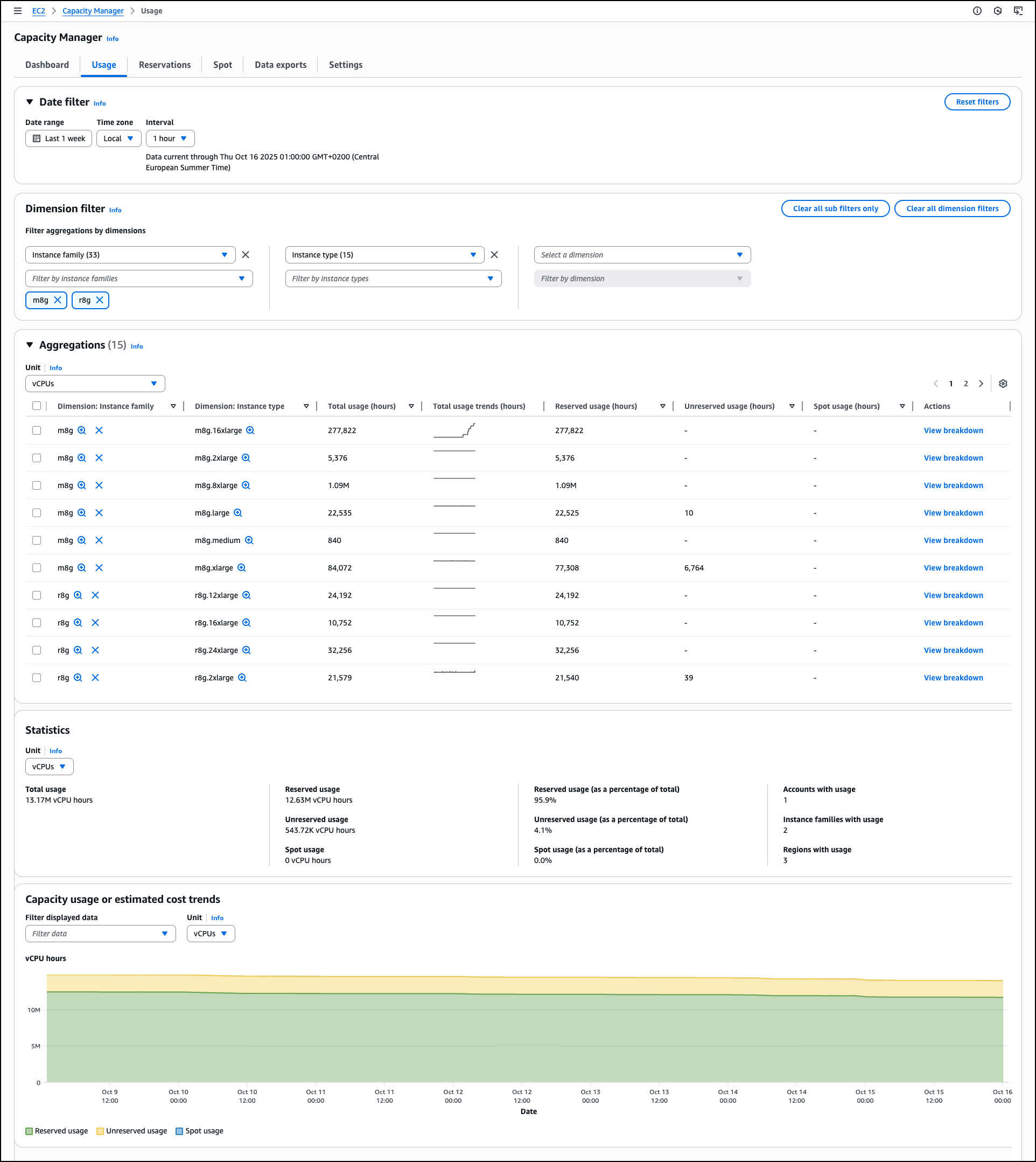
Deep-Dive Usage Analysis
The Usage tab delivers comprehensive historical trend analysis and detailed usage statistics across all AWS Regions.
Dimension Filtering
Create custom views by grouping and filtering capacity data across five key dimensions:
- Account ID - Isolate usage by specific accounts or account groups
- Region - Compare consumption patterns across geographic locations
- Instance Family - Analyze usage by compute, memory, storage, or GPU-optimized families
- Availability Zone - Identify zone-specific capacity patterns
- Instance Type - Drill down to specific instance configurations
These dimensional filters enable sophisticated analysis scenarios:
- Comparing usage patterns between development and production accounts
- Identifying regional cost optimization opportunities
- Analyzing instance family performance across workloads
Usage Coverage
The Usage tab tracks capacity data for:
- Spot Instances
- On-Demand Instances
- Capacity Reservations
- Reserved Instances
- Savings Plans
Note: Dedicated Hosts usage is not currently included in the Usage tab metrics.
Aggregations Table
The aggregations section provides a comprehensive usage table with:
- Instance family breakdowns with total usage statistics
- Reserved usage hours by type
- Unreserved usage hours
- Spot usage data
- View breakdown action for detailed analysis of each instance family
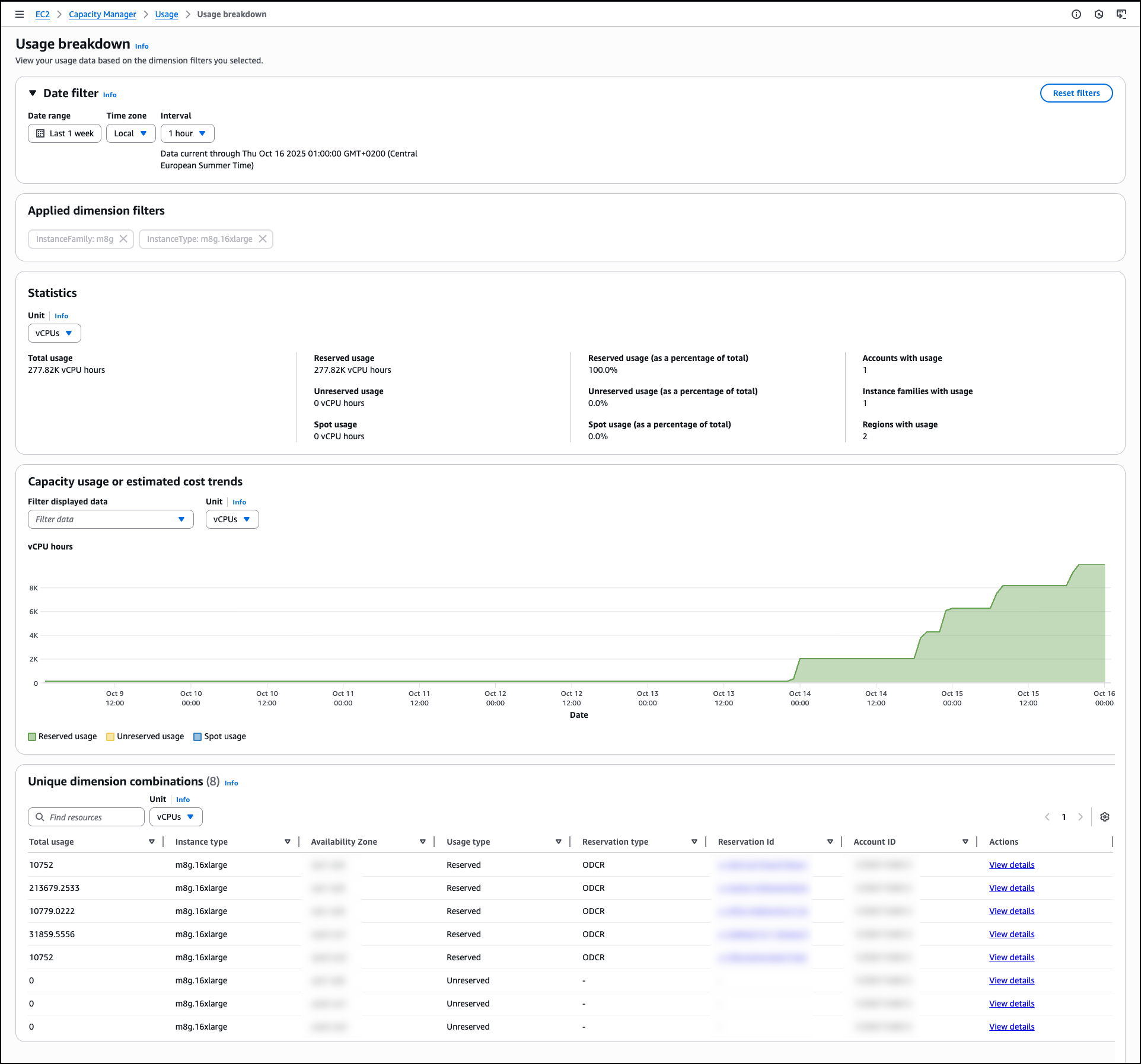
Selecting "View breakdown" from the aggregations table opens a detailed view showing usage patterns for individual instance types within the selected family and Availability Zone combinations, facilitating granular optimization decisions.
Capacity Usage Trend Visualization
The Capacity usage or estimated cost trends section provides interactive time-series charts showing:
- Overall usage trends across selected dimensions
- Reserved vs. unreserved usage evolution
- Spot Instance contribution over time
- Cost projections based on current usage patterns
You can dynamically adjust filters and measurement units to reveal historical patterns, compare costs across dimensions, and support data-driven capacity planning decisions.
Reservations Management Interface
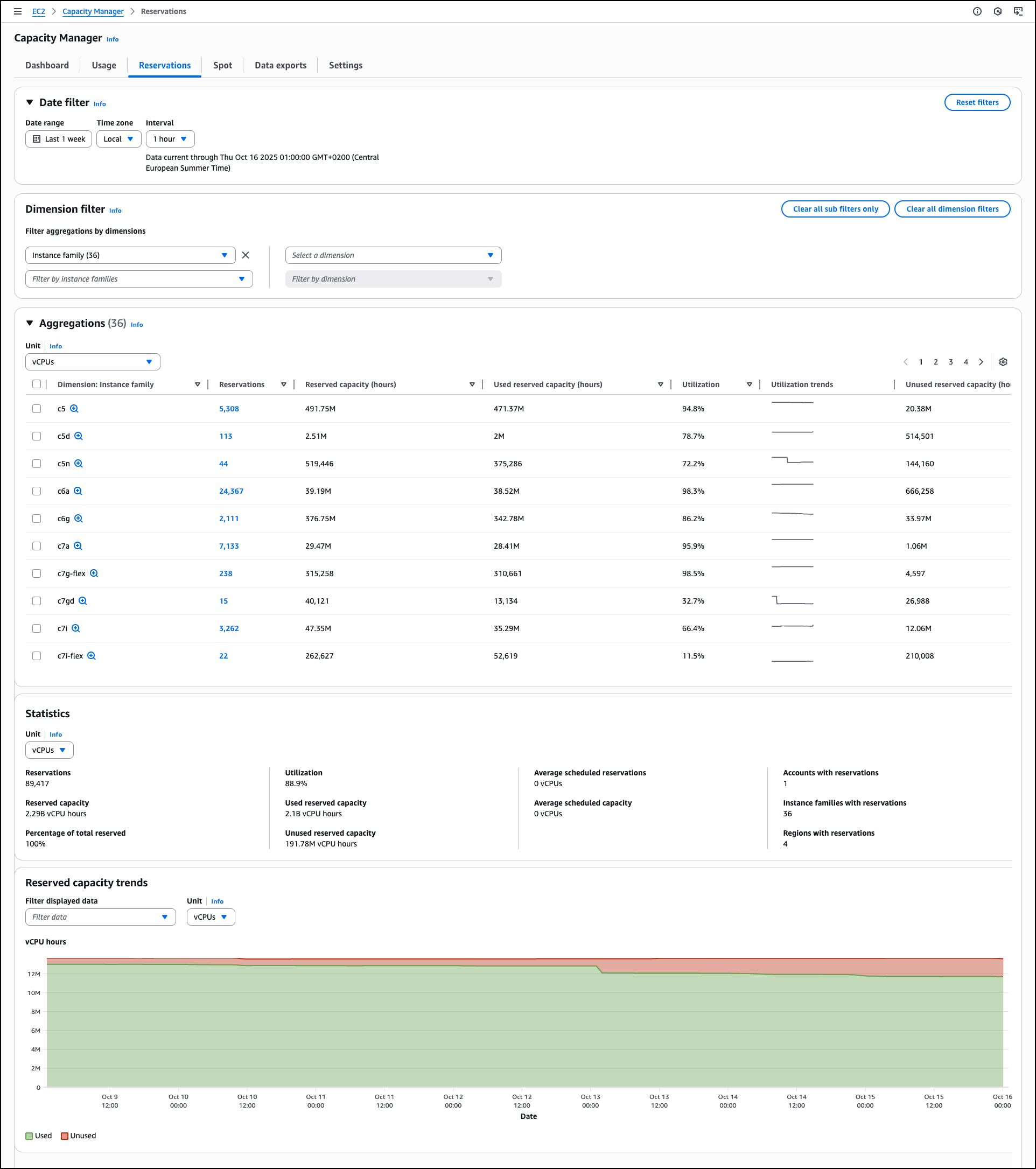
The Reservations tab consolidates all information about your Capacity Reservations with automated analysis generating prioritized optimization opportunities.
Advanced Filtering Options
Similar to the Usage tab, you can apply dimension filters plus additional reservation-specific options:
- Standard dimensions: Account ID, Region, Instance Family, Availability Zone, Instance Type
- Reservation-specific filters based on reservation status and configuration
Detailed Reservation Statistics
The Statistics section provides comprehensive summary metrics:
- Total reservations count - Number of active Capacity Reservations
- Overall utilization percentage - Aggregate utilization across all reservations
- Reserved capacity totals - Sum of all reserved vCPU hours or instance count
- Used and unused capacity volumes - Breakdown of consumed vs. idle capacity
- Average scheduled reservations - Typical scheduled reservation counts
- Accounts, instance families, and Regions distribution - Breadth of reservation footprint
These consolidated metrics help you understand reservation distribution and identify imbalances across your infrastructure.
Real-World Optimization Examples
EC2 Capacity Manager can reveal actionable insights such as:
Scenario 1: Account-Level Imbalances Discovery: Development accounts consistently show 30% reservation utilization while production accounts exceed 95%.
Action: Redistribute or modify reservations to better align with actual usage patterns, transferring underutilized capacity from development to production environments.
Scenario 2: Instance Family Inefficiencies Discovery: Specific instance families in certain Regions demonstrate sustained low utilization rates over multiple weeks.
Action: Consider reservation adjustments, instance type modifications, or workload optimization to improve utilization or reduce reserved capacity.
These insights support data-driven decisions about reservation purchases, modifications, or cancellations to align reserved capacity with actual consumption patterns.
Direct Reservation Management
When an On-Demand Capacity Reservation (ODCR) exists in the same account as Capacity Manager, you can modify reservation parameters directly from the interface:
- Update reservation quantities
- Adjust reservation schedules
- Modify instance type configurations
- Cancel underutilized reservations
This integrated management capability eliminates the need to navigate to separate EC2 console sections, streamlining the optimization workflow.
Spot Instance Analysis
The Spot tab focuses specifically on Spot Instance usage patterns and optimization opportunities.
Interruption Duration Analysis
EC2 Capacity Manager tracks and displays:
- Average duration Spot Instances run before interruption
- Interruption frequency patterns
- Instance family and Availability Zone interruption rates
- Historical interruption trends
This analysis helps you:
- Identify the most stable Spot Instance configurations
- Optimize workload placement for maximum uptime
- Design fault-tolerant architectures around expected interruption patterns
Spot Placement Score Integration
The service provides Spot placement score recommendations to improve workload flexibility and resilience. These recommendations suggest:
- Instance type diversification strategies
- Availability Zone selection for reduced interruption risk
- Capacity pool configuration for improved availability
By following these recommendations, you can enhance Spot Instance stability while maintaining cost advantages.
Data Export Capabilities
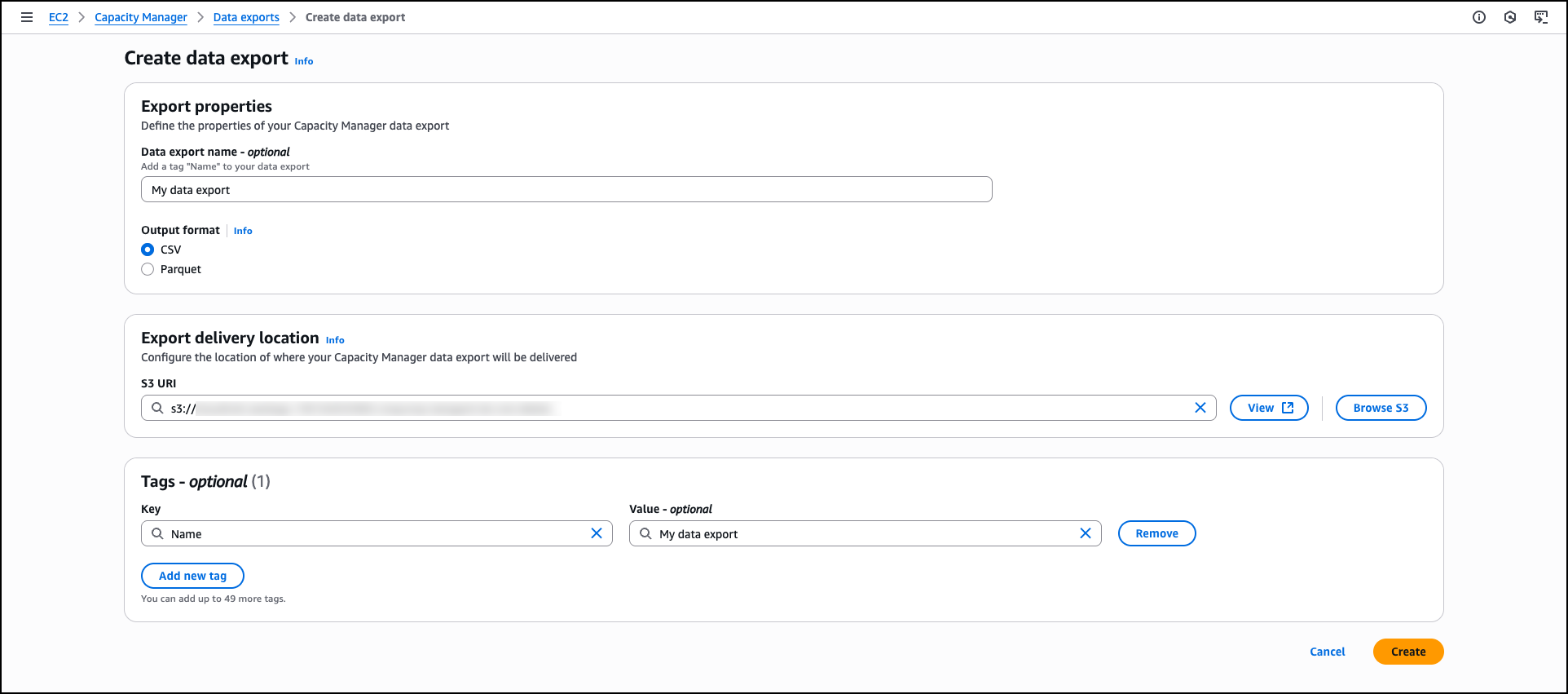
For organizations requiring extended analysis beyond the console interface, EC2 Capacity Manager includes robust data export functionality.
Export to Amazon S3
Configure automated data exports to Amazon S3 buckets through the Data exports tab:
- Create new export configurations
- Monitor delivery status and execution history
- Configure export schedules (daily, weekly, monthly)
- Define custom date ranges for historical exports
Extended Retention Benefits
Data exports provide several strategic advantages:
Long-Term Trend Analysis
- Capacity data retention beyond the 90-day console/API limit
- Multi-year historical analysis for capacity planning
- Seasonal pattern identification
- Growth trajectory forecasting
Integration with External Analytics
- Import into business intelligence platforms (Tableau, PowerBI, QuickSight)
- Combine with custom analytics workflows
- Integrate with existing reporting systems
- Feed into predictive modeling tools
Compliance and Auditing
- Maintain historical records for compliance requirements
- Support internal and external audits
- Track capacity allocation decisions over time
Enterprise-Wide Management with AWS Organizations
The Settings section enables centralized capacity management across multiple accounts through AWS Organizations integration.
Organizational Deployment Options
Enterprise-Wide Visibility Organization administrators can enable EC2 Capacity Manager across all accounts, providing:
- Consolidated visibility for executive reporting
- Cross-account optimization opportunity identification
- Standardized capacity management practices
Delegated Access Model Alternatively, administrators can delegate Capacity Manager access to specific accounts while maintaining:
- Appropriate permission boundaries
- Access control enforcement
- Account isolation where required
This flexible approach supports diverse organizational structures and security requirements.
Real-World Impact: Cost Optimization Success Stories
Organizations implementing EC2 Capacity Manager have reported significant operational and financial benefits:
Reduced Manual Analysis Time
Before: Engineering teams spent 15-20 hours per month collecting, aggregating, and analyzing capacity data from multiple sources.
After: Automated data aggregation and prioritized recommendations reduced analysis time to 2-3 hours monthly—an 85% reduction in operational overhead.
Improved Capacity Utilization
Before: Average Capacity Reservation utilization across the organization: 62%
After: Identification and optimization of underutilized reservations increased average utilization to 89%, significantly improving ROI on capacity investments.
Accelerated Optimization Cycles
Before: Quarterly capacity reviews with 4-6 week lag between identification and remediation of inefficiencies.
After: Weekly optimization reviews with same-day remediation, capturing savings opportunities before they accumulate.
Quantified Cost Savings
A mid-sized enterprise using EC2 Capacity Manager identified and optimized:
- 47 underutilized Capacity Reservations
- $127,000 in monthly unused reservation costs
- Additional $43,000 in monthly savings through Spot placement optimization
Total Monthly Savings: $170,000 or $2.04 million annualized
Best Practices for Maximizing EC2 Capacity Manager Value
Establish Regular Review Cadences
Weekly Reviews
- Monitor capacity overview cards for significant trend changes
- Review newest unused capacity recommendations
- Address critical optimization opportunities
Monthly Deep Dives
- Comprehensive analysis of usage patterns across all dimensions
- Reservation utilization assessment
- Spot Instance performance evaluation
- Data export for extended analysis
Quarterly Strategic Planning
- Long-term capacity trend analysis
- Reservation purchase planning
- Architecture optimization opportunities
- Cross-region capacity distribution review
Implement Automated Alerting
While EC2 Capacity Manager doesn't include native alerting, you can build custom alerts using:
- AWS Lambda functions processing exported data
- Amazon EventBridge for workflow automation
- Amazon SNS for notification distribution
- Third-party monitoring integrations
Tag Resources Comprehensively
Maximize the value of dimensional filtering by implementing robust tagging strategies:
- Cost center attribution
- Project or application identification
- Environment designation (production, staging, development)
- Owner or team accountability
Comprehensive tagging enables more granular analysis and clearer cost allocation.
Combine with AWS Cost Management Tools
EC2 Capacity Manager complements other AWS cost optimization tools:
- AWS Cost Explorer - Broader cost analysis across all AWS services
- AWS Compute Optimizer - Right-sizing recommendations for individual resources
- AWS Trusted Advisor - Additional capacity and cost optimization checks
- AWS Budgets - Spending alerts and budget enforcement
Use these tools together for comprehensive FinOps practices.
Getting Started Today
Amazon EC2 Capacity Manager is now available in all commercial AWS Regions enabled by default, providing immediate access to centralized capacity management capabilities.
Quick Start Steps
-
Access the Service
- Navigate to the Amazon EC2 console
- Select Capacity Manager from the navigation menu
- Enable the service with a single click
-
Review Your Capacity Landscape
- Examine the capacity overview cards
- Identify top unused capacity opportunities
- Analyze usage trends across key dimensions
-
Take Action on Optimization Opportunities
- Prioritize high-cost underutilized reservations
- Modify or cancel inefficient capacity commitments
- Implement Spot placement recommendations
-
Establish Ongoing Processes
- Schedule regular capacity reviews
- Configure data exports for extended analysis
- Integrate findings into capacity planning workflows
Additional Resources
- EC2 Capacity Manager Documentation - Comprehensive technical documentation
- AWS Management Console - Direct access to the service interface
- Service APIs - Programmatic access for automation and integration
The Future of Cloud Capacity Management
Amazon EC2 Capacity Manager represents a significant evolution in cloud infrastructure management, eliminating the operational complexity that previously hindered effective capacity optimization. By consolidating multi-account, multi-region capacity data into a single, actionable interface, AWS has removed a major barrier to efficient cloud resource utilization.
Key Takeaways:
- Eliminate Custom Automation - No more building and maintaining capacity data collection scripts
- Accelerate Optimization - Prioritized recommendations focus efforts where they matter most
- Improve Visibility - Comprehensive cross-account insights without context switching
- Reduce Costs - Identification of underutilized capacity directly impacts cloud spending
- No Additional Charge - Enterprise-grade capacity management at no extra cost
For organizations running EC2 at scale, adopting EC2 Capacity Manager isn't just about reducing operational overhead—it's about establishing a foundation for continuous capacity optimization and cost efficiency.
Let NeoNube Help You Maximize Your AWS Investment
At NeoNube, we specialize in helping organizations optimize their AWS infrastructure for performance, reliability, and cost efficiency. Our cloud experts can help you:
- Implement EC2 Capacity Manager - Proper setup and integration with your existing workflows
- Develop Optimization Strategies - Custom capacity management approaches for your specific workloads
- Automate Remediation - Build automated responses to capacity recommendations
- Establish FinOps Practices - Comprehensive cloud financial management frameworks
- Multi-Cloud Optimization - Extend capacity management across AWS, Azure, and GCP
Contact NeoNube today to schedule a complimentary AWS capacity assessment and discover how much you could be saving through optimized capacity management.
Originally based on AWS announcement by Esra Kayabali, Senior Solutions Architect at AWS, specializing in analytics, data warehousing, big data, and cloud technologies. Adapted and expanded by the NeoNube team.