Advanced S3 Cost Optimization: Intelligent Tiering, Automation, and Bucket Ownership - Part II
In continuation of our cost optimization best practices series, we're excited to share several more advanced enhancements that provide both significant cost optimization and powerful automation capabilities. These strategies helped our NeoNube customer achieve additional cost reductions while simplifying management of their S3 infrastructure.
Building on the lifecycle rules implemented in Part I, this article covers three critical optimization techniques:
- Intelligent Tiering - Dynamic storage class optimization
- Automation - Lambda-based lifecycle rule deployment
- Bucket Ownership Enforcement - Cross-account management compliance
1. Intelligent Tiering: Dynamic Cost Optimization
The Amazon S3 Intelligent-Tiering storage class has been purposefully designed to streamline storage costs by dynamically relocating data to the most economical access tier in response to evolving access patterns.
Understanding the Tiers
This storage class intelligently categorizes objects into three distinct access tiers, each tailored to specific usage scenarios:
- Frequent Access Tier - Optimized for frequently accessed objects (default)
- Infrequent Access Tier - Lower-cost tier for infrequently accessed data
- Archive Access Tier - Remarkably cost-efficient tier for rarely accessed data
When to Use Intelligent-Tiering
Our NeoNube customer implemented Intelligent-Tiering based on specific factors:
- Extended storage duration - Objects stored for months or years
- Large objects - Objects exceeding 128KB in size
- Unpredictable access patterns - Data access varies significantly over time
Prerequisites and Considerations
Before transitioning to Intelligent-Tiering, consider these important factors:
- Minimum object size - Objects smaller than 128KB remain in the frequent access tier and won't be moved to infrequent access
- Minimum storage duration - S3 Intelligent-Tiering imposes a 30-day minimum storage duration charge. If objects are deleted within 30 days, an alternative storage class should be chosen
- Access pattern analysis - Ensure your objects have varied access patterns for maximum benefit
Implementing Intelligent-Tiering
To add Intelligent-Tiering to your S3 buckets:
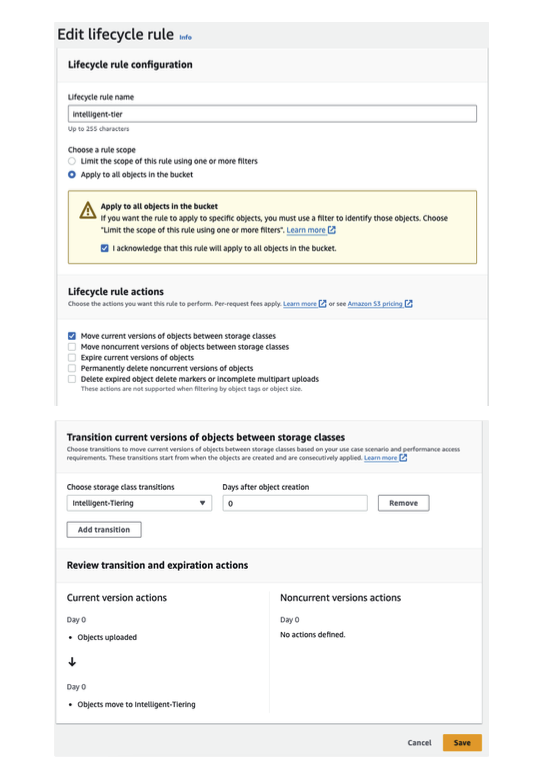
- Navigate to Lifecycle configuration in your S3 bucket settings
- Click Create lifecycle rule
- Specify the number of days after object creation when intelligent tiering should become operational
- Configure the rule to apply to the objects you want to optimize
The system will automatically transition objects between access tiers based on actual usage patterns, optimizing costs without requiring manual intervention.
2. Adding Automation: Lambda-Powered Cost Optimization
Our challenge was to implement all the lifecycle rules across all new and existing buckets while maintaining the ability to exclude specific buckets based on custom criteria. Manual implementation would be time-consuming and error-prone.
Solution Overview
We developed a Lambda function that integrates seamlessly with EventBridge (CloudWatch Events). The Lambda is configured to trigger every night, ensuring that the specified rules are consistently applied across all buckets in the account.
Implementation Steps
Step 1: Build and Push Docker Image to Amazon ECR
The Lambda function runs in a containerized environment for consistency and reliability. Detailed instructions on creating the Dockerfile and pushing it to Amazon Elastic Container Registry (ECR) are provided in our GitHub repository. This ensures that the Lambda function runs in a standardized environment regardless of AWS Lambda's runtime updates.
Step 2: Deploy the Lambda Function
Follow the deployment guidelines in our repository to deploy the Lambda function, ensuring that it is properly configured with appropriate IAM permissions and VPC settings if needed.
Step 3: Configure EventBridge for Nightly Execution
Configure EventBridge (formerly CloudWatch Events) to trigger the Lambda function at specified intervals. Our customer set it to run every night, ensuring continuous application of optimization rules. This could be adjusted to run more or less frequently based on your needs.
Key Benefits
- Consistency - Rules applied uniformly across all buckets
- Automation - No manual intervention required
- Flexibility - Easy to exclude specific buckets or modify rules
- Scalability - Automatically applies to new buckets created in the account
3. Enforce Bucket Ownership in Your Account
Managing extensive data volumes from diverse sources presents unique challenges. When receiving large datasets allocated to various S3 buckets, it's common for some files to be assigned to owners who are not the actual account holders. This can create compliance issues and complicate access control management.
The Challenge
Our NeoNube customer often received large data sets from external partners allocated to various S3 buckets. During data replication and migration processes, objects sometimes retained their original ownership, creating security and compliance gaps.
The Solution
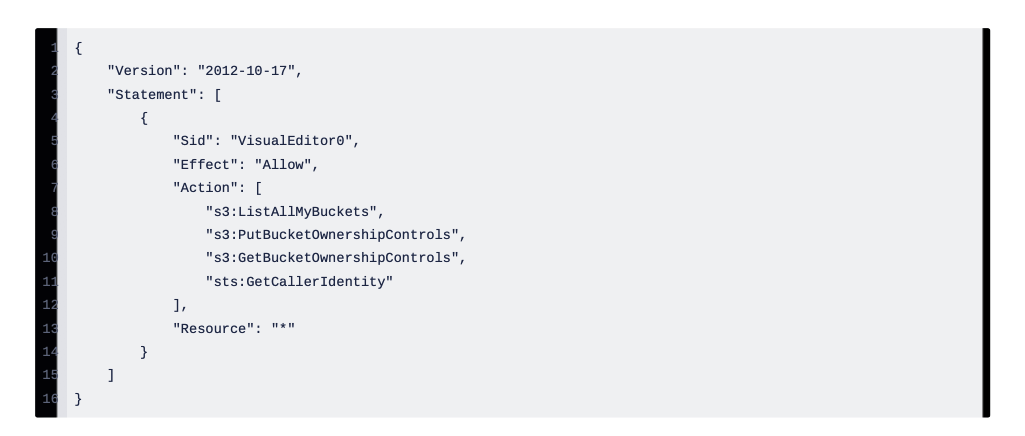
We implemented a Lambda function designed to iterate through all buckets within the account and configure them with BucketOwnershipEnforce. This approach ensures that correct ownership is enforced for each bucket, resolving any discrepancies that may arise during the data handling process. After creating the Lambda, add the following policy as an inline policy to the Lambda IAM role: Policy Name - s3-ownership-enforce-policy
How BucketOwnershipEnforce Works
When enabled, BucketOwnershipEnforce automatically transfers ownership of all objects in the bucket to the bucket owner, regardless of their original ownership. This is particularly useful for:
- Cross-account bucket replication - Simplifies permission management
- Third-party data uploads - Ensures consistent ownership
- Compliance requirements - Maintains audit trails and access control
Implementation with Slack Notifications
Our Lambda function:
- Scans through all buckets in the account
- Enforces correct ownership via BucketOwnershipEnforce
- Notifies your team via Slack integration to #s3-ownership-alerts
This integration ensures your team stays informed about ownership status and any alerts, allowing for quick response to ownership-related issues.
Implementation Instructions
After creating the Lambda function, add the following inline policy to the Lambda IAM role:
Policy Name: s3-ownership-enforce-policy
{
  "Version": "2012-10-17",
  "Statement": [
    {
      "Sid": "VisualEditor0",
      "Effect": "Allow",
      "Action": [
        "s3:PutBucketOwnershipControls",
        "s3:GetBucketOwnershipControls",
        "s3:ListAllMyBuckets",
        "s3:GetBucketLocation"
      ],
      "Resource": "*"
    },
    {
      "Sid": "SlackNotification",
      "Effect": "Allow",
      "Action": [
        "secretsmanager:GetSecretValue"
      ],
      "Resource": "arn:aws:secretsmanager:*:*:secret:slack-webhook-*"
    }
  ]
}
Configuration Steps
- Create your Lambda function with the Python code from the GitHub repository
- Add the IAM policy above to your Lambda execution role
- Configure the Slack webhook URL in AWS Secrets Manager
- Set up EventBridge to trigger the Lambda daily
- Test the function and verify Slack notifications
Combined Impact: The Full Picture
By implementing all three strategies together—lifecycle rules (Part I), Intelligent-Tiering, automation via Lambda, and bucket ownership enforcement—our NeoNube customer achieved:
Cost Optimization Results
- Additional 15-25% cost reduction through Intelligent-Tiering
- Elimination of manual overhead - 20+ hours per month saved on S3 management
- Consistent policy enforcement across 100+ buckets
- Improved security posture through ownership compliance
Operational Benefits
- Reduced human error - Automated enforcement eliminates configuration mistakes
- Audit compliance - Clear ownership and policy trails for regulatory requirements
- Team visibility - Slack integration keeps everyone informed in real-time
- Scalability - New buckets automatically get optimized policies applied
Monitoring and Optimization
After implementing these strategies, monitor:
- S3 Metrics - Track storage costs, access patterns, and tier distribution
- Lambda Metrics - Monitor execution time, error rates, and success rates
- Slack Notifications - Review alerts and ownership changes
- Monthly Reports - Compare costs month-over-month
Best Practices Summary
- Start with analysis - Understand your access patterns before enabling Intelligent-Tiering
- Automate everything - Use Lambda to enforce policies consistently
- Monitor continuously - Set up CloudWatch alarms for anomalies
- Plan for growth - Design automation to scale with new buckets
- Document thoroughly - Keep runbooks for common troubleshooting scenarios
- Test in non-production - Always pilot changes on test buckets first
How NeoNube Can Help
The NeoNube team specializes in implementing these advanced optimization strategies for organizations managing complex S3 environments. We provide:
- Architecture Review - Assess your current S3 setup and optimization opportunities
- Automation Implementation - Deploy and configure Lambda functions and EventBridge rules
- Policy Development - Create custom policies tailored to your compliance requirements
- Ongoing Optimization - Continuous monitoring and fine-tuning of your S3 environment
- Team Training - Ensure your team understands and can maintain the automation
Conclusion
S3 cost optimization is not a one-time activity—it's an ongoing practice. By combining lifecycle rules, Intelligent-Tiering, automation, and proper ownership enforcement, you create a self-optimizing storage infrastructure.
Our NeoNube customer's multi-phase optimization approach demonstrates that significant cost savings are achievable through thoughtful architecture, automation, and continuous monitoring. Combined with the lifecycle rules from Part I, organizations typically achieve:
- 40-60% total S3 cost reduction within 6 months
- Dramatically reduced operational overhead
- Improved security and compliance posture
- Better data governance and visibility
The investment in automation pays dividends through both cost savings and operational efficiency.
Ready to optimize your S3 environment?
The NeoNube team can help you implement these advanced strategies and achieve similar results. Whether you're just starting with lifecycle rules or ready for full automation, we have the expertise to guide you.
Schedule a consultation with NeoNube today to develop a customized S3 optimization roadmap for your organization.
For code examples and implementation details, visit our repository: https://github.com/Einavf77/s3-cost-reduction-lambda
Based on real-world implementation with one of our NeoNube customers in the financial services industry. Results and timelines may vary based on your specific infrastructure and access patterns.