S3 Cost Reduction and Optimization Using Lifecycle Rules
Over the past few years, a leading NeoNube customer's cloud infrastructure has undergone significant transformations. Growing from a startup to a major enterprise involves implementing new compliance and security requirements. As the business has scaled, the company's cloud systems have expanded dramatically, creating new operational challenges.
As part of their evolution, the organization adopted a control tower structure for cloud governance. This required them to migrate live traffic and historical data between accounts while maintaining cost-effectiveness throughout the process.
The company manages substantial volumes of data from diverse channels—data received via APIs, files representing financial activity generated by partners, and data sourced from credit bureaus and other data providers.
During the migration to the control tower architecture, syncing data between the old and new infrastructure was critical. Storing this data in both systems directly impacted operational costs, so maintaining cost-effectiveness became a primary focus.
In this article, we'll review the data-related optimization activities that helped this NeoNube customer lower their S3 infrastructure costs significantly.
First Challenge: Understanding Data and Activity Patterns
The initial challenge was gaining insights into data quantity, identifying the buckets storing the most data, and discerning usage patterns. AWS Lens proved most effective for this task, providing visibility into S3 usage patterns and facilitating discovery of key optimization opportunities:
- Identifying Largest S3 Buckets: AWS Lens enabled the team to pinpoint their largest S3 buckets, offering a clear overview of where the majority of data resided.
- Locating Incomplete Multipart Uploads: The tool helped identify incomplete multipart uploads, crucial for optimizing storage efficiency.
- Reducing Non-Current Versions: AWS Lens detected the number of non-current versions retained in versioned buckets.
Using S3 Storage Lens
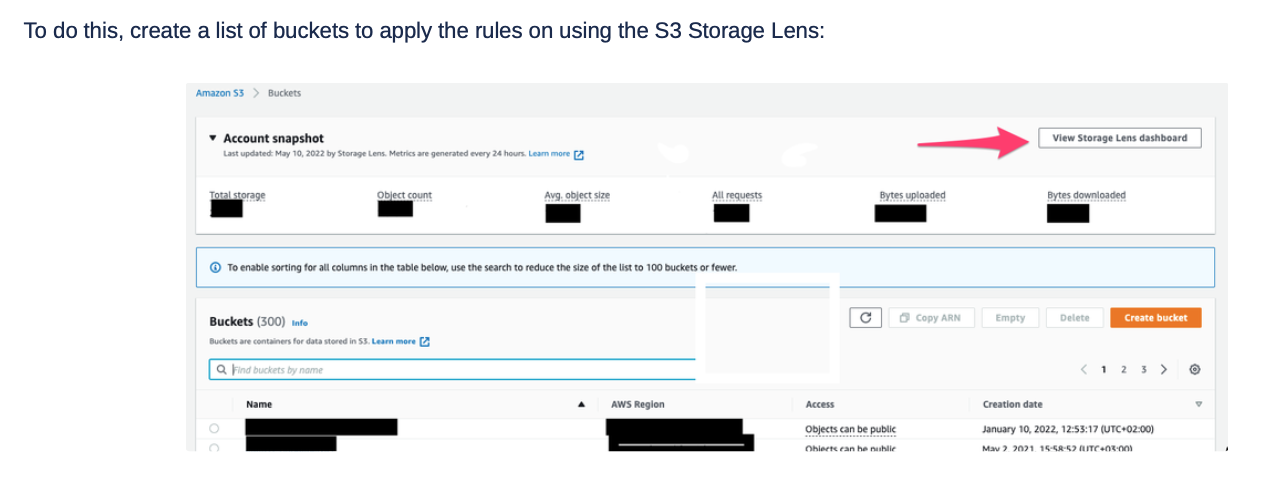
To create a list of buckets to apply optimization rules:
- Access the S3 Storage Lens dashboard
- Scroll to the "Top N overview" section and select the top number of buckets (e.g., top 25)
- Filter using these metrics:
- Non-current version bytes
- Delete marker object count
- Incomplete MPU bytes
Create a prioritized list of buckets with significant storage overhead (more than 100GB) for targeting with lifecycle rules.
Streamlining Storage with Lifecycle Rules
To address storage challenges and optimize costs, the customer implemented Lifecycle Rules based on insights from AWS Lens. These rules targeted three key areas:
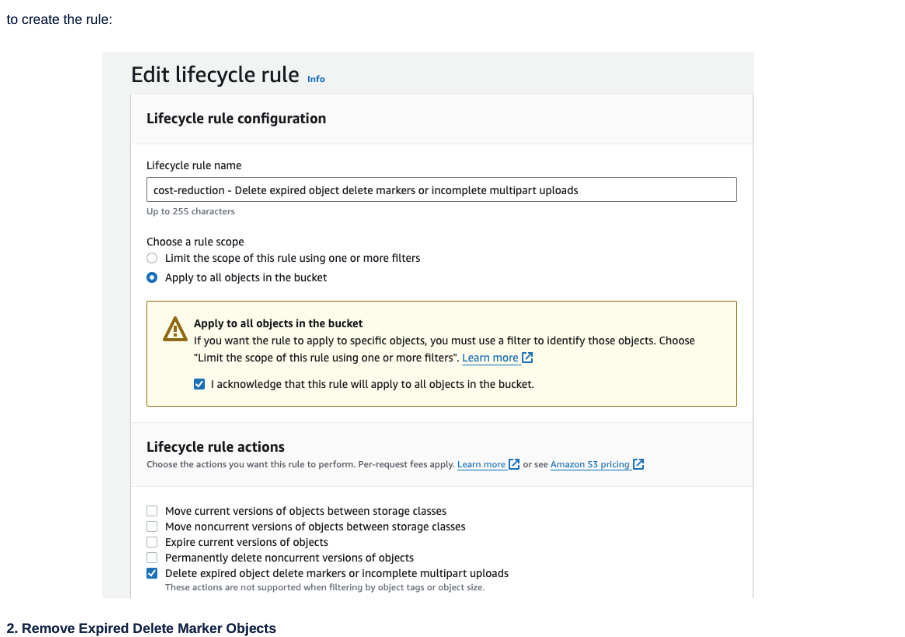
1. Delete Incomplete Multipart Upload Bytes
Understanding Incomplete Multipart Uploads
Incomplete multipart uploads occur when multipart upload requests aren't sent successfully, leading to unnecessary storage costs. In this case, a significant number of objects larger than 100MB and a massive sync between buckets led to incomplete multipart upload issues. Since incomplete multipart uploads accrue charges until completion, the team created a rule to address this specific challenge.
The rule targeted deletion of incomplete multipart uploads, preventing accumulation of unused upload parts.
2. Remove Expired Delete Marker Objects
In versioning-enabled buckets, expired object delete markers can accumulate unnecessarily. By deleting these markers when no object versions remain, the customer maintained a clean and efficient storage structure, reducing storage costs associated with marker management.
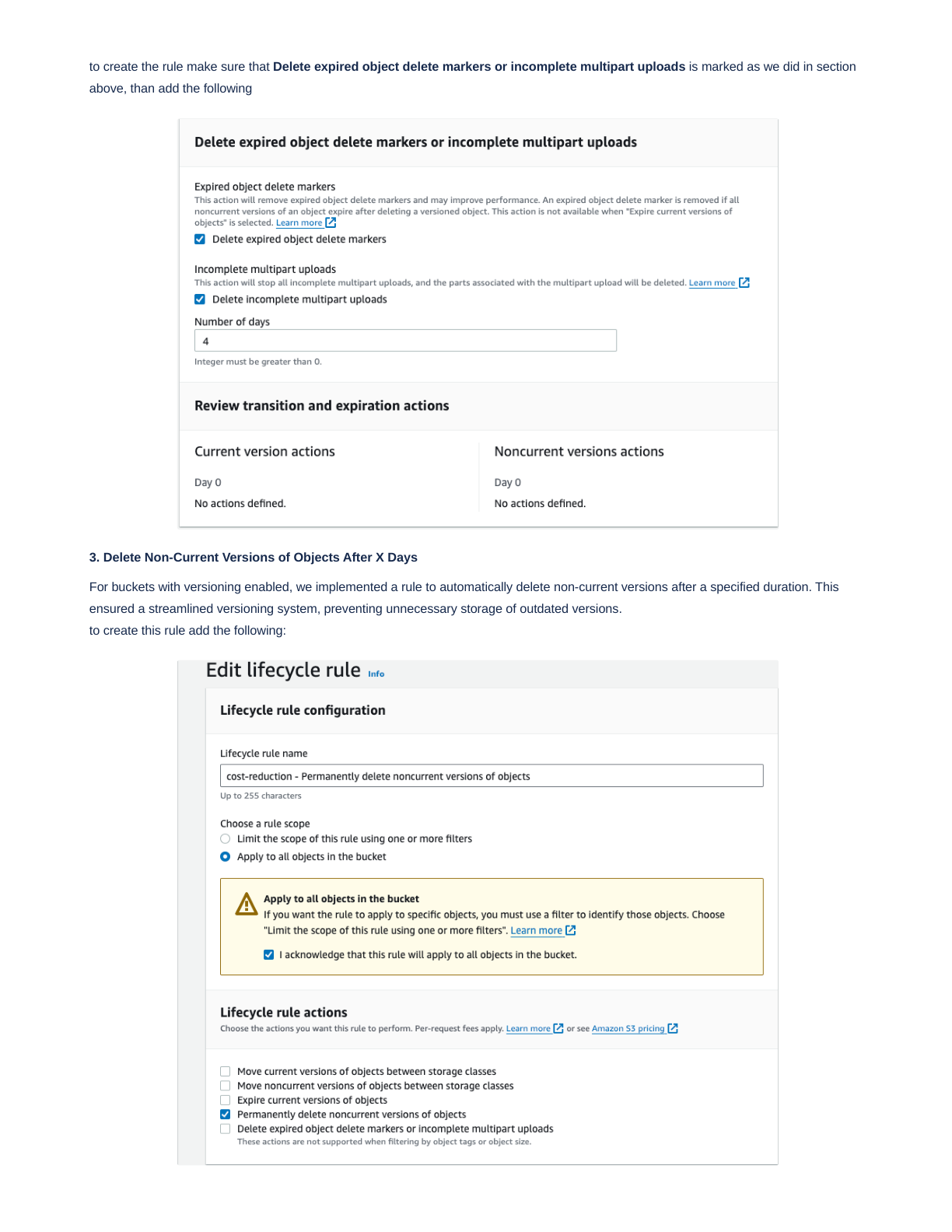
3. Delete Non-Current Versions of Objects After X Days
For buckets with versioning enabled, the team implemented a rule to automatically delete non-current versions after a specified duration. This ensured a streamlined versioning system, preventing unnecessary storage of outdated versions.
Results and Cost Savings
The advantages of these lifecycle rules became evident over time, manifesting in improved S3 metrics and substantial cost savings. Once configured, these rules work automatically and consistently, contributing to a more efficient and cost-effective S3 environment.
Key Metrics Improvements
- Storage capacity reduction: Immediate reduction in total bucket sizes
- Operational efficiency: Automated cleanup eliminating manual management
- Cost normalization: Consistent monthly cloud spend predictions
- Performance improvement: Faster object retrieval with cleaner bucket structure
Measurable Outcomes
Through the strategic use of AWS Lens and Lifecycle Rules, this NeoNube customer was able to:
- Gain full control over S3 usage patterns
- Optimize storage practices comprehensively
- Achieve significant monthly cost savings
- Automate ongoing storage optimization
By implementing these lifecycle management strategies during their critical infrastructure migration, the customer maintained cost-effectiveness while successfully transitioning to their new cloud governance model.
Best Practices for S3 Optimization
- Regular Audits: Use AWS Lens quarterly to review storage patterns and identify new optimization opportunities
- Progressive Implementation: Start with lifecycle rules on high-cost buckets before expanding organization-wide
- Monitoring and Alerts: Set up CloudWatch alerts to monitor storage metrics and lifecycle rule execution
- Documentation: Maintain clear documentation of all lifecycle rules and their business rationale
- Testing: Test lifecycle rules in non-production environments first
How NeoNube Can Help
At NeoNube, we specialize in helping organizations optimize their AWS infrastructure for cost and performance. We can assist you with:
- Storage Assessment: Comprehensive analysis of your S3 buckets and storage patterns
- Lifecycle Strategy: Design of tailored lifecycle rules for your specific use cases
- Implementation: Safe, phased implementation of storage optimization strategies
- Monitoring: Ongoing monitoring and optimization of your S3 environment
- Cost Analysis: Detailed reporting on achieved savings and ongoing optimization opportunities
Contact NeoNube today to optimize your S3 storage costs and achieve significant cloud savings.
Based on real-world implementation with one of our NeoNube customers in the financial services industry. Results and timelines may vary based on your specific infrastructure.